The Complete Guide to Completing an Ergonomics Risk Assessment within an Industrial/Manufacturing Environment.
Introduction: From Ramazzini to Human-Centred Factories
The roots of ergonomics go back centuries. In the 17th–18th centuries, physician Bernardino Ramazzini chronicled work-related ailments among trades, foreshadowing modern practice. Ergonomics took a formal leap during World War II, when scientists redesigned equipment and controls to match human capabilities and reduce error.
Today, the International Ergonomics Association (IEA) defines ergonomics (human factors) as both a scientific discipline—concerned with how people interact with other elements of a system—and a professional practice that applies theory, evidence and methods to design for two outcomes: enhanced human well-being and overall system performance.. In short: fit the task to the human, a principle long championed by Kroemer & Grandjean.
Despite clear benefits, ergonomics is often sidelined by Pheasant’s Five Fallacies:
- “This design is satisfactory for me – it will, therefore, be satisfactory for everybody else.
- “This design is satisfactory for the average person – it will, therefore, be satisfactory for everybody else.”
- “The variability of the human beings is so great that it cannot possibly be catered for in any design – but since people are wonderfully adaptable it doesn’t matter anyway.”
- “Ergonomics is expensive and since products are actually purchased on appearance and styling, ergonomic considerations may conveniently be ignored.”
- “Ergonomics is an excellent idea. I always design things with ergonomics in mind – but I do it intuitively and rely on my common sense so I don’t need tables of data.
This guide dismantles those myths with a practical, end-to-end process you can use to complete an ergonomics risk assessment in manufacturing—technically robust, compliant, and business-savvy.
What “Holistic” Really Means in an Ergonomics Risk Assessment
A best-in-class ergonomics risk assessment goes far beyond posture and lifting. Consider:
- Organisational environment: culture, schedules, supervision, targets.
- Physical: forces, posture, repetition, reach, vibration, lighting, thermal.
- Emotional & social: stress, frustration, teamwork, safety climate.
- Cognitive: attention, memory load, decision complexity, signage/alarms.
- Physiology: fatigue, recovery, individual capabilities/limitations.
- Tools & equipment: design, adjustability, usability, maintenance.
- Activities & tasks: work as actually performed (not just documented).
To cover this scope, your ergonomics team needs capabilities across insight, measurement, assessment & analysis, and design.
Step-by-Step: Completing an Ergonomics Risk Assessment
1) Task Load Survey: Measure and Benchmark What Workers Experience
When you can’t observe everyone all the time, a Task Load survey provides scale.
- Quantitative ratings using NASA-TLX dimensions: Mental Demand, Physical Demand, Temporal Demand, Performance, Effort, Frustration.
- Task Load scores at team/department/site level to benchmark hotspots and track improvement over time.
- Open-ended questions for thematic analysis—surfacing issues like equipment gaps, workstation layout problems, or repetitive micro-tasks.
- Outcome: Together, these inputs let you diagnose high-risk departments and paint a clear picture of the main themes affecting wellbeing and performance.
Download & Data Capability
- Backgorund to the NASA-TLX RAW
- Enterprise-scale analytics with Morgan Maxwell: we aggregate NASA-TLX scores and comments across sites, shifts, and roles, then run robust statistical analysis delivering Power BI heatmaps, confidence intervals, before/after effect sizes, and departmental risk rankings with theme maps to guide action.

2) Contextual Enquiry & Design Ethnography: See Real Work, Not Assumptions
Many programmes fail by optimising for “the average user” or how work is supposed to be done. Contextual enquiry (observing and interviewing in situ) and design ethnography correct that.
- Participant selection: include extreme users (e.g., 5th–95th percentile stature, novice/expert, left/right-handed, strength limits). Extreme users expose failure points hidden by averages.
- Shadowing & short interviews: “Show me”, “What’s hardest on your body?”, “What’s your workaround when it’s busy?”
- Evidence capture: annotated photos/videos (with consent) of reach, grip, line-of-sight, congestion, and workaround hacks.
User Trials with Extreme Users (beyond observation)
Ethnography reveals reality; user trials validate change under repeatable conditions.
- Criteria: task time, quality/defects, error types, RULA/REBA scores, exertion & push/pull forces.
- Protocol: baseline (current method) vs intervention (new station/tool).
- Decision rule: release only when pre-set thresholds are met (e.g., ≥20% posture-risk reduction with no productivity loss).
3) Ergonomics Risk Assessment: Apply the Right Tools to the Right Tasks
Use validated tools to quantify risk and prioritise fixes:
- REBA – Whole-body postural risk in dynamic/handling tasks.
- RULA – Upper-limb postural risk (seated/standing, repetitive/static).
- ART – Repetitive upper-limb tasks (frequency, force, posture, breaks).
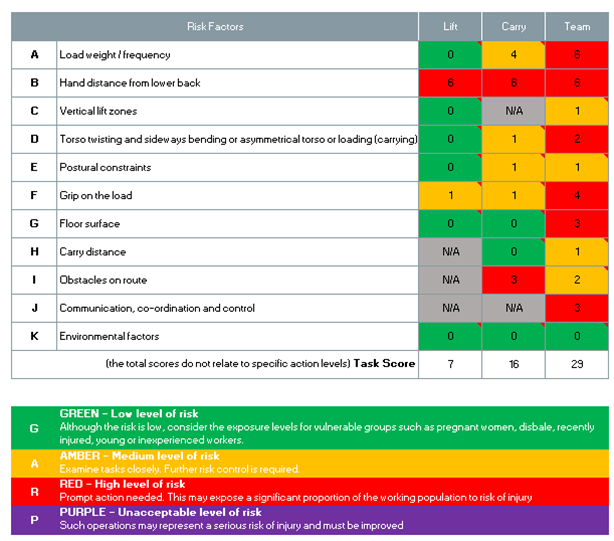
- MAC – Manual lifting/carrying/team handling with traffic-light scoring.
- RAPP – Pushing/pulling tasks (start/sustain forces, posture, distance, frequency).
Industrial Ergonomics AI Software (Ergo Edge): Automate, Scale, and Standardise
Modern assessments can be accelerated and de-biased with AI-powered posture analysis:
- What it does: Morgan Maxwell’s Industrial ergonomics software Ergo Edge uses computer vision and 3D human simulation to analyse job videos and auto-score methods like RULA/REBA (and support the MAC & ART Tools), generating consistent risk ratings and annotated posture timelines.
- How it works: Record short clips on a mobile device → upload to the secure cloud → receive a task breakdown, posture risk heatmaps, and priority rankings—often reducing manual analysis time by up to 90%.
- Outputs you can act on: PDF and dashboard reports, before/after comparisons, and AI-generated recommendations aligned to common controls (engineering, admin, training).
- Where it shines: high-throughput assembly lines, warehousing & logistics, repetitive sub-tasks on machine tending, or any process where you need rapid, repeatable scoring at scale.
- Why it helps: standardises assessments across sites and assessors, speeds triage for hotspot tasks, and frees specialists to focus on solution design.
Learn more / request a demo: Ergo Edge – Industrial Ergonomics AI Software
https://www.morganmaxwell.co.uk/ergo-edge-software/
Choosing your assessment workflow: paper, spreadsheets, or AI (Ergo Edge)
You can complete REBA, RULA, ART, MAC, RAPP assessments in three main ways. Each delivers the same method, but differs in speed, scale, and reporting.
- A) Paper-based worksheets
- What it is: Printed official worksheets scored by hand during a floor walk.
- Best for: One-off spot checks, low-tech sites, coaching on the shop floor.
- Strengths: Zero setup, resilient, easy to explain while observing tasks.
- Limitations: Manual math/transcription, slower to aggregate, harder to compare pre/post.
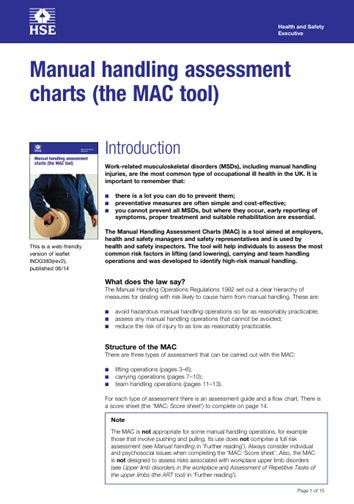
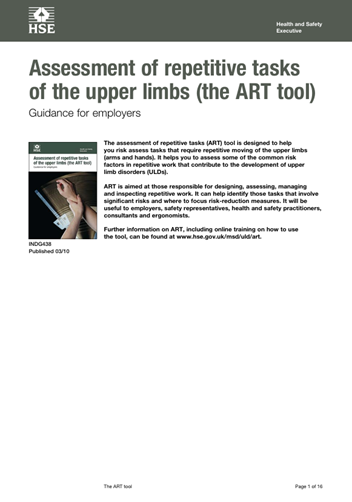
Image 2: PDF versions pf the Health and Safety Executives MAC and ART tools
B) Spreadsheet calculators (Excel/Google Sheets)
- What it is: Locked templates with formulas/drop-downs for each tool, plus fields for task metadata.
- Best for: Team audits, monthly reviews, before/after comparisons, simple dashboards.
- Strengths: Consistent scoring, quick roll-ups and charts, easy to share and archive.
- Limitations: Still time-intensive to code postures from photos/video; version control needed.
C) AI-powered software (Ergo Edge)
- What it is: Upload short task videos; AI (computer vision + 3D simulation) auto-scores RULA/REBA (and supports NIOSH), generates posture heatmaps and risk rankings.
- Best for: High-volume lines, multi-site programmes, frequent re-assessments where consistency matters.
- Strengths: Major time savings, standardised scoring across assessors, rich visuals and instant before/after comparisons.
- Limitations: Requires decent video angles/lighting and consent; expert review recommended for top findings.
- Learn more: Ergo Edge – Industrial Ergonomics AI Software: https://www.morganmaxwell.co.uk/ergo-edge-software/

Table 1: Tool-Selection Matrix (What to Use, When to Combine)
| Primary exposure / task type | Best-fit tool (primary) | Useful secondary | Combine when… |
| Whole body | REBA | MAC | Static and dynamic postures within tasks |
| Upper limb | RULA | ART | Static and repetitive postures within tasks |
| Upper limb repetitive (more than 2 hours per day) | ART | RULA | Repetitive and static upper limb focussed postures within tasks. |
| Manual handling tasks including lifting, carrying & team carrying. | MAC | REBA | Repetitive and static whole-body postures within tasks |
| Pushing, pulling, dragging churning and rolling. | RAPP | Force measurement | Floors/ramps vary; high start/sustain forces. |
Mixed tasks often need two tools (e.g., MAC for lift + ART for repetitive sub-steps). Re-score after interventions to evidence improvement.
4) Digital Human Modelling (DHM): Design It Right Before You Build It
Before you cut steel or buy tooling, simulate the work. Digital Human Modelling predicts reach, clearance, visibility, posture load, and cycle time for diverse workers.
- Outputs: percentile-based reach envelopes, joint-angle/posture scoring (predicting RULA/REBA), line-of-sight checks, and what-if comparisons (height/tilt/orientation).
- Value: designs out risk early, reduces costly late changes, and proves ISO 14738 coverage for 5th–95th percentile users.
- Learn more / work with us: Digital Human Modelling for Ergonomics
https://www.morganmaxwell.co.uk/digital-human-modelling-ergonomics-consultant/
5) Reporting & Action Plan: Make It Unmissable
A great assessment dies in a bad report. Make yours clear, visual, decision-ready:
- Executive summary (1–2 pages): top risks, expected benefits, roadmap (costs/timelines).
- Method & evidence: NASA-TLX heatmaps; contextual highlights; tool results (REBA/RULA/ART/MAC/RAPP/NIOSH/Ergo Edge) with priority ranking.
- Compliance mapping: how actions satisfy MHOR 1992, MHSWR 1999, HSWA 1974, PUWER 1998, DSE 1992, and align with ISO 14738 / ISO 27501.
- Recommendations by horizon:
Short-term (0–3 months): height tweaks, bin relocation, job rotation, micro-breaks, mats, lighting, targeted training.
Medium-term (3–12 months): engineered solutions—adjustable benches, lift assists/hoists, powered tugs, tool redesign; layout changes; ergonomics champions.
Long-term (12+ months): integrate ergonomics into design & procurement, automate high-risk tasks, embed human-centred KPIs and continuous improvement.
- Follow-up & KPIs: set dates to re-assess; track incidents, Task Load scores, quality, cycle time; publish before/after results.
6) Standards, Best Practice & UK Legal Requirements
ISO Standard examples & Human-Centred Decisions
- ISO 14738 — Safety of machinery: anthropometric requirements for workstations at machinery. Use it to set reach envelopes, clearances, and working heights accommodating a broad user population (often 5th–95th percentile).
- ISO 27501 — The human-centred organization (guidance for managers). Embeds human-centred design (HCD) in leadership decisions, procurement, and CI—so ergonomics becomes a management standard, not a side project.
UK Legal Duty: Managing Ergonomic Risks Is Required
- HSWA 1974: general duty to ensure employees’ health, safety and welfare.
- MHSWR 1999: duty to assess risks—including ergonomic risks—and implement preventive measures.
- MHOR 1992: avoid hazardous manual handling where reasonably practicable; assess and reduce any that remains; provide training.
- PUWER 1998: work equipment must be suitable and safe (including ergonomic suitability).
- DSE 1992: assess and reduce risks from display screen work (relevant for manufacturing support roles and control rooms).
7) Demonstrating ROI: The Business Case for Ergonomics
“Eventually all work comes down to people… people are an asset, not just a cost.” — Oxenburgh (2004)
A credible ergonomics programme speaks the language of finance and operations:
- Fewer injuries & claims → lower direct costs (treatment, compensation) and much lower indirect costs (backfill, training, downtime, supervision, investigation).
- Higher productivity → less fatigue, fewer micro-pauses, better takt adherence, smoother flow.
- Better quality → reduced defects when posture, force, and line-of-sight are optimised.
- Retention & engagement → lower recruitment and onboarding costs; reduced absenteeism and presenteeism.
- Lower legal risk → stronger compliance and documentation.
Build the case quickly: use our live ROI Calculator to quantify incident cost avoidance, time savings, quality gains, and turnover reduction:
https://www.morganmaxwell.co.uk/roi-calculator/
Tie your narrative to Task Load score reductions and REBA/RULA/ART/MAC/RAPP/Ergo Edge scores to make benefits visible and auditable. Oxenburgh’s Human Centred Design first aligns with ISO 27501—designing work around people consistently pays back.
Resources & Downloads
- NASA-TLX raw background.
- Ergo Edge – Industrial Ergonomics AI Software: https://www.morganmaxwell.co.uk/ergo-edge-software/
- Digital Human Modelling (service page): https://www.morganmaxwell.co.uk/digital-human-modelling-ergonomics-consultant/
- Ergonomics ROI Calculator: https://www.morganmaxwell.co.uk/roi-calculator/
About the Author
Stephen Bowden, Chartered Ergonomist (C.ErgHF), CIEHF-registered. Stephen specialises in industrial ergonomics, human factors methods, and human-centred design in complex manufacturing environments.
CIEHF profile: https://ergonomics.org.uk/resource/morgan-maxwell.html
Linked In Profile: linkedin.com/in/stephen-bowden-bb8590b8
References
- ISO 14738:2002. Safety of machinery — Anthropometric requirements for the design of workstations at machinery. International Organization for Standardization.
- ISO 27501:2019. The human-centred organization — Guidance for managers. International Organization for Standardization.
- Kroemer, K.H.E., & Grandjean, E. (1997). Fitting the Task to the Human: A Textbook of Occupational Ergonomics (5th ed.). CRC Press.
- Pheasant, S. (1996). Bodyspace: Anthropometry, Ergonomics and the Design of Work (2nd ed.). Taylor & Francis.
- Oxenburgh, M., Marlow, P., & Oxenburgh, A. (2004). Increasing Productivity and Profit through Health and Safety: The Financial Returns from a Safe Working Environment. CRC Press.
- HSE (UK). Manual Handling Operations Regulations 1992 (MHOR) — Guidance and tools.
- HSE (UK). Management of Health and Safety at Work Regulations 1999 — Guidance.
- HSE (UK). Provision and Use of Work Equipment Regulations 1998 (PUWER) — Guidance.
- HSE (UK). Display Screen Equipment Regulations 1992 — Guidance.
- Hart, S.G., & Staveland, L.E. (1988). Development of NASA-TLX (Task Load Index): Results of empirical and theoretical research. In Advances in Psychology (Vol. 52). North-Holland.